Silence That Keyboard! Making Late-Night FPS Comfortable with Desk Mats and Silent Rings
Is your 'clicky' keyboard sound getting into your mic during midnight FPS sessions? Learn how to quiet it down without losing performance using desk mats and silent O-rings.
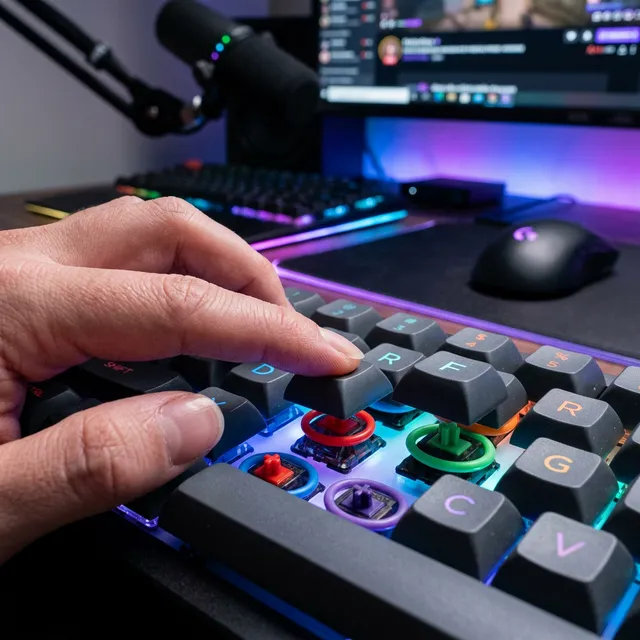
Have you ever been told “your keyboard is too loud” during late-night voice chats? You don’t need to buy an expensive silent keyboard; you can drastically reduce noise for a few dollars.
Why Silencing Keyboard Clicking Matters and How It Works
Keyboard noise consists of two types: “the switch click itself” and “vibration transmitted to the desk.”
Physical Reasons Why Keyboard Noise is Hated in Streams
Microphones easily pick up high-pitched, sharp sounds (clicks), which can be stressful for viewers. The key is to suppress the “Bottom-out Sound”—the impact sound when you press a key all the way down.
The Role of Desk Mats as Vibration Dampers
Placing a keyboard directly on a desk turns the entire surface into a speaker for impact sounds. A thick desk mat acts as a “vibration damper” to absorb this energy.
Instant Solutions! Silent Rings and Desk Mats
Under $10 Solution! Hiding Silent Rings Under Keycaps
By removing keys and placing silicone O-rings on the stems, you can eliminate the impact sound of bottoming out. The feel becomes slightly softer, but it gets dramatically quieter.
Stopping “Desk Ringing” with Large 4mm+ Desk Mats
Thickness is important for soundproofing, not just mouse stability. If possible, placing a 100-yen shop joint mat under your desk mat creates the ultimate anti-vibration environment.
Software Techniques to Remove Keyboard Noise via Mic Settings
In addition to physical measures, try these settings:
- Noise Suppression (e.g., NVIDIA Broadcast): AI can clean up clicking sounds perfectly.
- Adjust Directionality: Moving the mic away from the keyboard and closer to your mouth (using a mic arm) is the most effective tactic.
For more, see our Summary of Noise Countermeasures for Streaming Gear.